

The morning number sometimes fluctuates like a stock market index
You eat well all week, step on the scale in the morning, and the number is a kilo higher than yesterday. Sound familiar? Or the opposite: the scale unexpectedly shows two kilos less, and it feels like things are finally going well. A couple of days later, it’s all back, and that feeling of hopelessness hits straight away.
Neither number actually tells you about your body fat. Body weight fluctuates by a kilo or two from day to day, sometimes even more, and that’s mainly down to water. A salty dinner, more carbohydrates than usual, a tough workout, poor sleep, your menstrual cycle, or simply when you last ate and drank all affect your morning reading. Fat doesn’t appear or disappear that quickly. A kilo of fat represents approximately 7700 kilocalories, so that’s not what’s changing on the scale overnight.
To better capture the trend rather than just a moment in time, we’ve changed how we show your weight in the FunTastyQ Fit app.
The new big number: trend weight
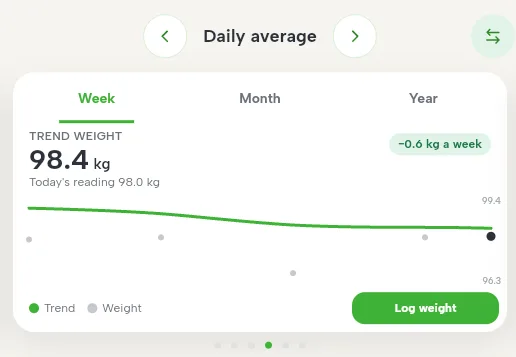
Your weight card now prominently displays your trend weight. This is your weight with daily water fluctuations smoothed out. Today’s reading is still there underneath in smaller text, so nothing is lost.
Your trend weight doesn’t jump to a new level with every weigh-in. Each new reading pulls it a little closer. The longer the gap between weigh-ins, the more the new reading counts, but a single weigh-in is never the whole story. Trend weight takes roughly the last couple of weeks into account.
For example: your trend weight is 84,0 kg. One morning, the scale reads 82,6 kg. The app says: “Today you’re 1,4 kg below your trend. A one-day change this large is mostly water.” Your trend weight moves to 83,9. The next morning, after a pizza night, the scale reads 85,1 kg. Your trend weight is back at 84,0. Your weight jumped 2,5 kilos in two days, while your trend weight moved 0,1. Your actual situation hadn’t changed at all during that time.
Weight card updates
Trend weight in large type. This is the number that’s actually worth tracking.
Today’s reading in smaller type. If you haven’t weighed yourself today, you’ll see your latest reading along with the date.
Direction in kilos per week. This shows how much your trend weight has changed over the past two weeks. If it’s moving towards your goal, it’s green; if it’s moving away, it’s orange.
The chart’s grey dots are your weigh-ins, and the line is your trend weight. The dots are positioned at the correct dates, so even a longer break is visible.
Why this is better than before
Until now, the app drew a straight trend line through the weigh-ins for the selected period. This approach had three flaws.
The line did not account for dates. Two weigh-ins a day apart and two a fortnight apart were spaced equally on the graph. This could make the line show a faster or slower change than was actually happening.
A single outlier skewed the entire line. One unexpectedly low morning reading could pull the end of the line down by a kilo, even though your weight was actually stable.
Only the latest reading was displayed prominently. The number you looked at most was actually quite arbitrary.
Trend weight fixes all three. It accounts for actual dates, a single outlier barely shifts it, and the number now displayed prominently reflects where you really stand. That means you no longer have to wonder every morning whether yesterday’s eating “ruined everything”. If your trend weight is moving in the right direction, so are you.
How often should you weigh yourself?
You’ll see your trend weight once you’ve weighed yourself at least three times in the last 30 days. Until then, the app shows your latest reading and tells you how many more weigh-ins you need.
The more often you weigh yourself, the more accurate your trend weight will be. A good routine is at least two to three times a week, always in the morning after using the toilet and before eating. If it’s been more than two weeks since your last weigh-in, we show your trend weight in grey and ask you to weigh yourself again.
Where to find it
You’ll find your trend weight on the weight card in the daily summary in FunTastyQ Fit. It’s already available online at funtastyq.com/app; on your phone, update the app to version 2.8.0.
